
 by
by By Olivia Ragsdale
Social media is unpredictable. It’s hard to keep up with. Creating and maintaining a consistent posting cadence can be challenging if you are unprepared. But here’s the thing: you don’t have to figure it out as you go. This step-by-step guide will walk you through how to build an Instagram content calendar that actually works.
What is a Content Calendar?
So what is a content calendar? It’s a tool you use to plan and organize content. It’s just as it sounds, but it’s a little more complex than that. Let me break it down. It’s the framework for what you’ll post, when you post it, how it aligns with your goals. It’s your mapped out strategy to avoid scrambling for content.
Why You Need One
According to Sprout Social, consistency is critical to building trust and credibility with your audience. When your followers know they can expect quality content from you regularly, they’re more likely to engage and follow along. Content calendars save you time by eliminating daily scrambling for ideas. Instead of stressing about what to post tomorrow, you’ve already planned ahead. They also keep you organized so you’re not repeating the same topics.
Bonus: According to Buffer, consistent posters received a 5x more engagement — likes, comments, and shares — per post than users who posted inconsistently. So yeah, that content calendar is definitely worth your time.
Step 1: Understand Your Audience
The first step is understanding who you’re posting for. Get to know your audience. What types of content do they like? How often do they scroll? Do they prefer Reels or carousel posts?
Once you understand your audience, what do you want from them? Are you looking for leads, visibility, or community engagement? Once you understand your goals and your audience, it’s time to build your calendar.
Step 2: Build Your Calendar
There are many ways to build a content calendar. You can build one using project management tools or with spreadsheets. Sprout Social recommends spreadsheets like Google Sheets or Excel as a simple starting point, or you can try visual tools like Trello or Later if you want something more interactive. Personally, I prefer spreadsheets because they’re easier to work with.
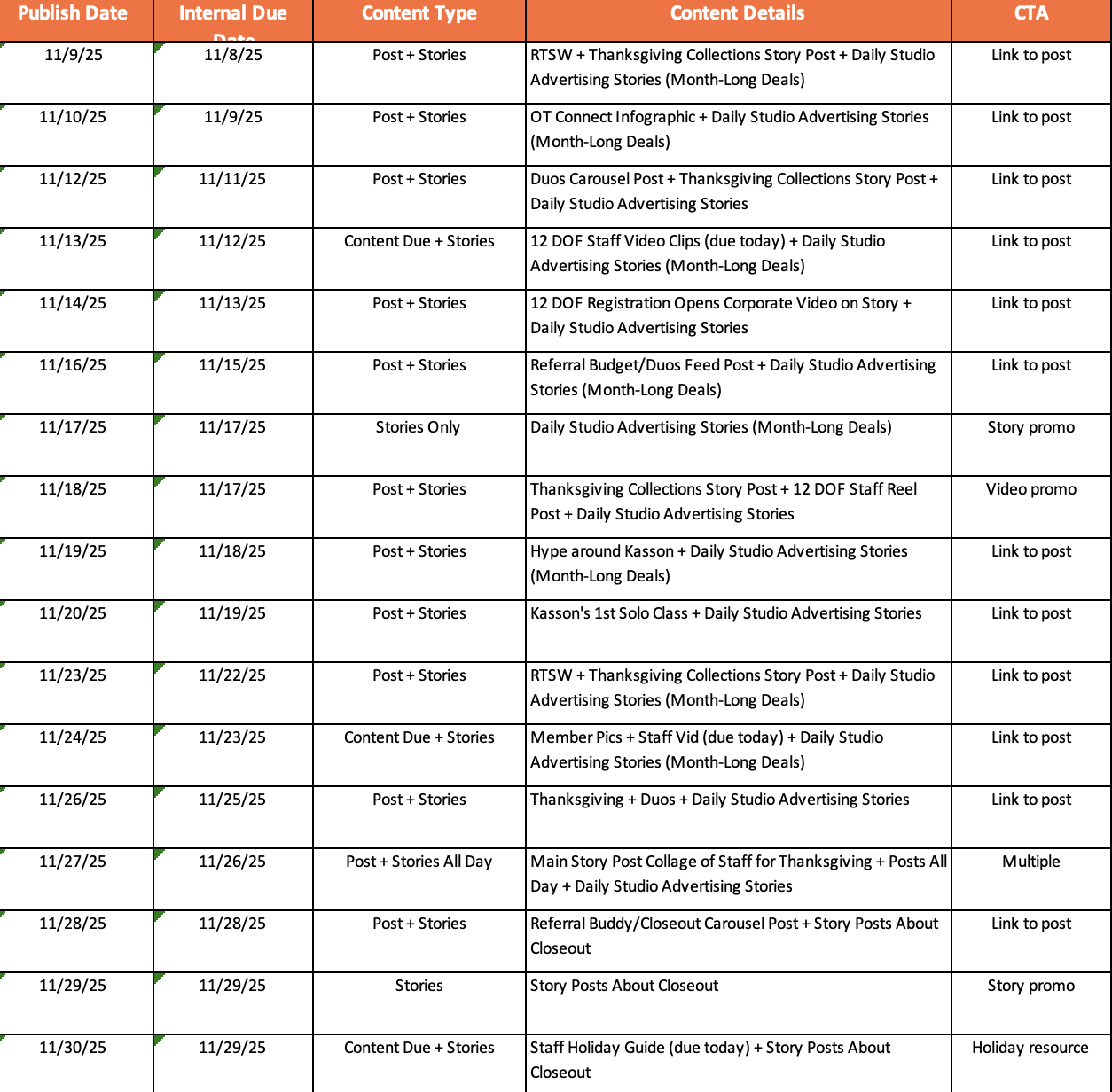
Here’s how you build a content calendar via spreadsheets:
Step one: Open a calendar on your phone or other device and look at the month you are planning for. Determine the dates that you want to post on and put them in your spreadsheet.
Step two: Organize your spreadsheet in sections. I organize by publish date, internal content due date, content details, and CTA. There are many other ways to organize this, but this is just my preferred method. (Refer to my content calendar on the right to see how I organize mine.)
Step three: Put your scheduled content into a social media software device.
Plan 2 to 4 weeks in advance. Mix up your content types so you’re not posting the same format every day. Balance evergreen content (tips and advice that stay relevant) with timely content (trending sounds, current events, seasonal moments).
Best Practices
Check your Instagram analytics to see when your audience is most active and post at those times. Stay flexible and adjust your calendar when trending topics come up. Don’t overload your schedule. Quality always beats quantity.
Connect with me on LinkedIn!
References:
Buffer Consistent Posting Study – https://buffer.com/resources/consistent-posting-study/
Sprout Social Content Calendar Guide – https://sproutsocial.com/insights/content-calendar/
Column Content Content Calendar Guide – https://columncontent.com/content-calendar/
Buffer Social Media Calendar Tool – https://buffer.com/resources/social-media-calendar/

Hi Olivia! Great blog post! I love how clearly you break down the purpose and value of a content calendar, it really does take the stress out of posting. Your step-by-step approach makes the process feel manageable, especially for anyone just getting started.
Hi Olivia!
I loved how in-depth this post was! As someone that doesn’t have much experience with content calendars or the behind-the-scenes of social media, so this was super insightful on how to get started!
Hi Olivia- The tips on mixing posts, stories, and timing really are very helpful with what students need when juggling school and life. It makes me want to revamp my own social-media strategy and stay more organized!
Hi Olivia! I really enjoyed your post! I like how clearly you broke down the steps for creating an Instagram content calendar. It makes the process feel more approachable. I especially appreciated your tips about mixing evergreen and timely content, and the reminder to check analytics for optimal posting times. Your examples of spreadsheet organization were super practical, too. Overall, great job and good tips I can potentially use in the future!
This is great, Olivia! I have always used content calendars without really thinking about why I’m using them, so I enjoy your logical breakdown. I also appreciate the image of what a typical content calendar might look like in your step-by-step guide.
Hi Olivia! This was a really impressive post and I would definitely refer back to this if I were to create an Instagram content calendar for a client. This simplified the process and made it seem less overwhelming and made it feel more doable!
Hello Olivia, content calendars have been a helpful tool for me as I start to create my own content and as I prepare to maybe do this work for a company in the future. Explaining the steps the way you did has been beneficial to visualize it easier so I really appreciate that. Thank you for putting these insights out there.
Hi Olivia! I really liked your post — you explained content calendars in such a simple and practical way. I appreciated how you walked through each step, especially the part about understanding your audience before planning anything. Your spreadsheet organization tips were super helpful too, because that’s something a lot of people struggle with when they’re starting out. I also loved the stats you included about consistency and engagement — it really shows why planning ahead matters. This post definitely made building a content calendar feel way more doable.